Wannier calculation inside AiiDAlab#
Overview#
This tutorial will guide you through the process of setting up and running an Wannier calculation for GaAs.
Steps#
Step 1 Select a structure#
For this tutorial task, please use the From Examples tab, and select the Gallium arsenide structure.
Click the Confirm button to proceed.
Step 2 Configure workflow#
In the Basic Settings tab, set the following parameters:
In the Structure relaxation section, select
Structure as is.In the Step 2.1: select properties section, select
Wannier90
Then go to the Step 2.2 Wannier90 tab and select Compute real-space Wannier functions.
Click the Confirm button to proceed.
Step 3 Choose computational resources#
We can use the default code.
Then, click the Submit button.
Step 4 Check the status and results#
The job may take 10~30 minutes to finish.
Here, we compare the Wannier-interpolated bands with the full DFT bands calculation.

Here, we show the real-space Wannier functions for the GaAs system.
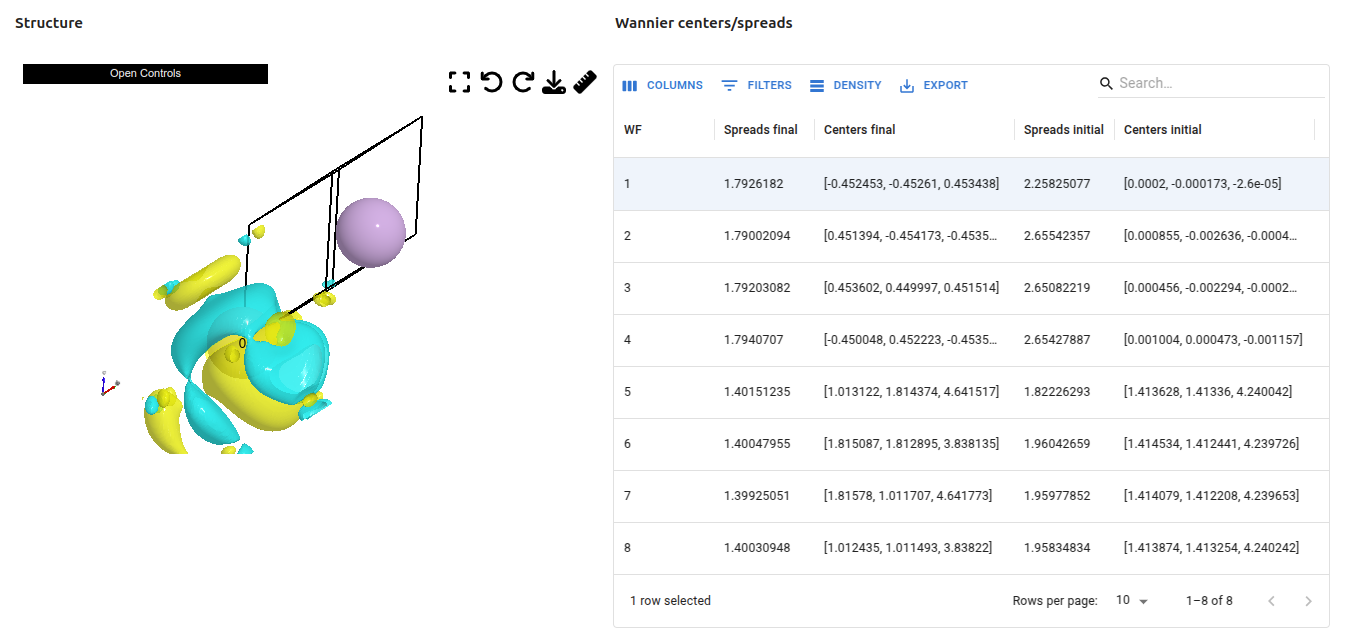
Congratulations, you have finished this tutorial!
Questions#
If you have any questions, please, do not hesitate to ask on the AiiDA discourse forum: https://aiida.discourse.group/.